Electron Processes and Communication: Clearing Up Common Confusions
 Ryan
RyanOn this page
When working with Electron, it is easy to mix up a few questions: Does another page mean another complete copy of Chromium? Do preload and page scripts each have their own DOM? Does using MessagePort eliminate copying?
Start with this distinction: A page, a JavaScript context, and an operating system process are three different layers. The communication channel and the way data is passed are separate choices, too.
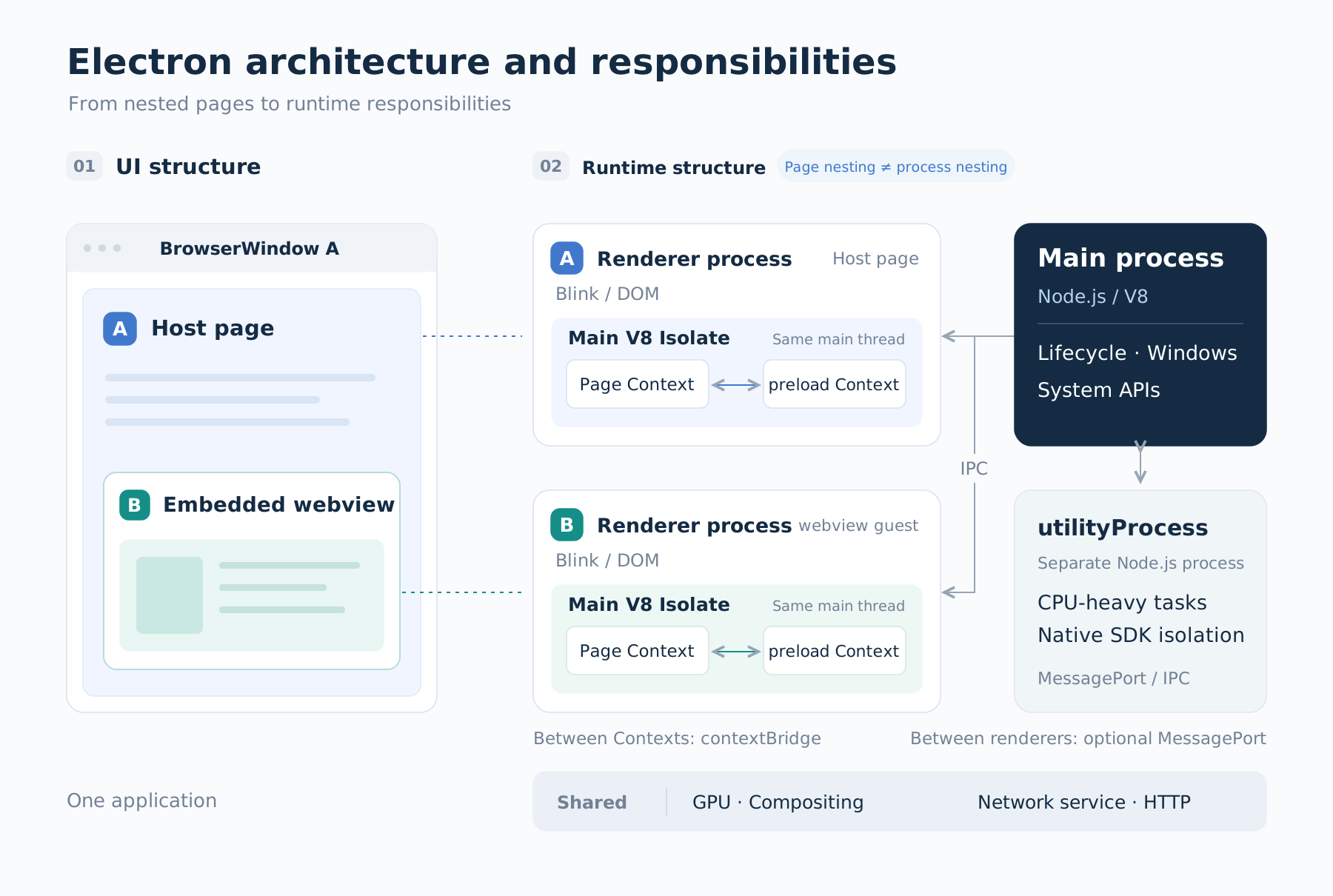
Nesting in the interface does not define process boundaries at runtime.
1. One webContents Does Not Mean One Complete Copy of Chromium
Electron inherits Chromium's multi-process architecture. But each page is not a complete browser of its own.
BrowserWindowis a desktop windowwebContentsis an object that manages web content, with APIs for navigation, script execution, and messaging- A renderer is a process that runs page scripts and handles tasks such as layout and painting
- The application also has a main process, a GPU process, and processes that run services such as networking
The GPU process, network service, and main process are not all duplicated for every page.
Nor is the relationship between webContents and renderers always one-to-one. A page with cross-site subframes may involve multiple renderers. Processes may also be reused or replaced during navigation according to Chromium's policies.
So the number of windows, the number of webContents, and the number of renderers are three different counts. When investigating memory use or slowdowns, look at the actual processes and frames, rather than just counting windows.
2. How Many Environments Are There When a Local Page Embeds a webview?
Suppose a BrowserWindow loads local HTML that embeds a remote webview. Both the host and the guest have preload scripts configured, with contextIsolation enabled.
Looking only at these two top-level pages, and leaving out additional iframes and Workers, the setup is:
| Page | Page scripts | Preload | DOM |
|---|---|---|---|
| Local host | Host's main world | Host's isolated world | Local page's DOM |
| Remote guest | Guest's main world | Guest's isolated world | Remote page's DOM |
There are two page DOMs and four primary JavaScript contexts, not four browser engines.
Within the same page, preload and page scripts access the same underlying DOM through their own JavaScript wrapper objects. If preload changes the text of an existing element, the page can see that change. But if preload sets window.foo, the page may not be able to read it. With isolation enabled, the two worlds have separate global objects and prototype environments.
That is the purpose of contextIsolation. When exposing functionality, use contextBridge to provide a narrow interface. Do not expose the entire ipcRenderer to a remote page.
One layer deeper, a V8 Isolate has its own JavaScript heap, and one Isolate can contain multiple Contexts. The page and preload worlds are usually two Contexts within the same Isolate on the renderer's main thread. They are not two separate engines, and this is not process-level memory protection. Node.js does not contain Chromium; both use V8. Node.js in the main process and the renderer use different Isolates, but integrating Node.js does not necessarily require an additional Isolate. A sandboxed preload is not a full Node.js environment either.
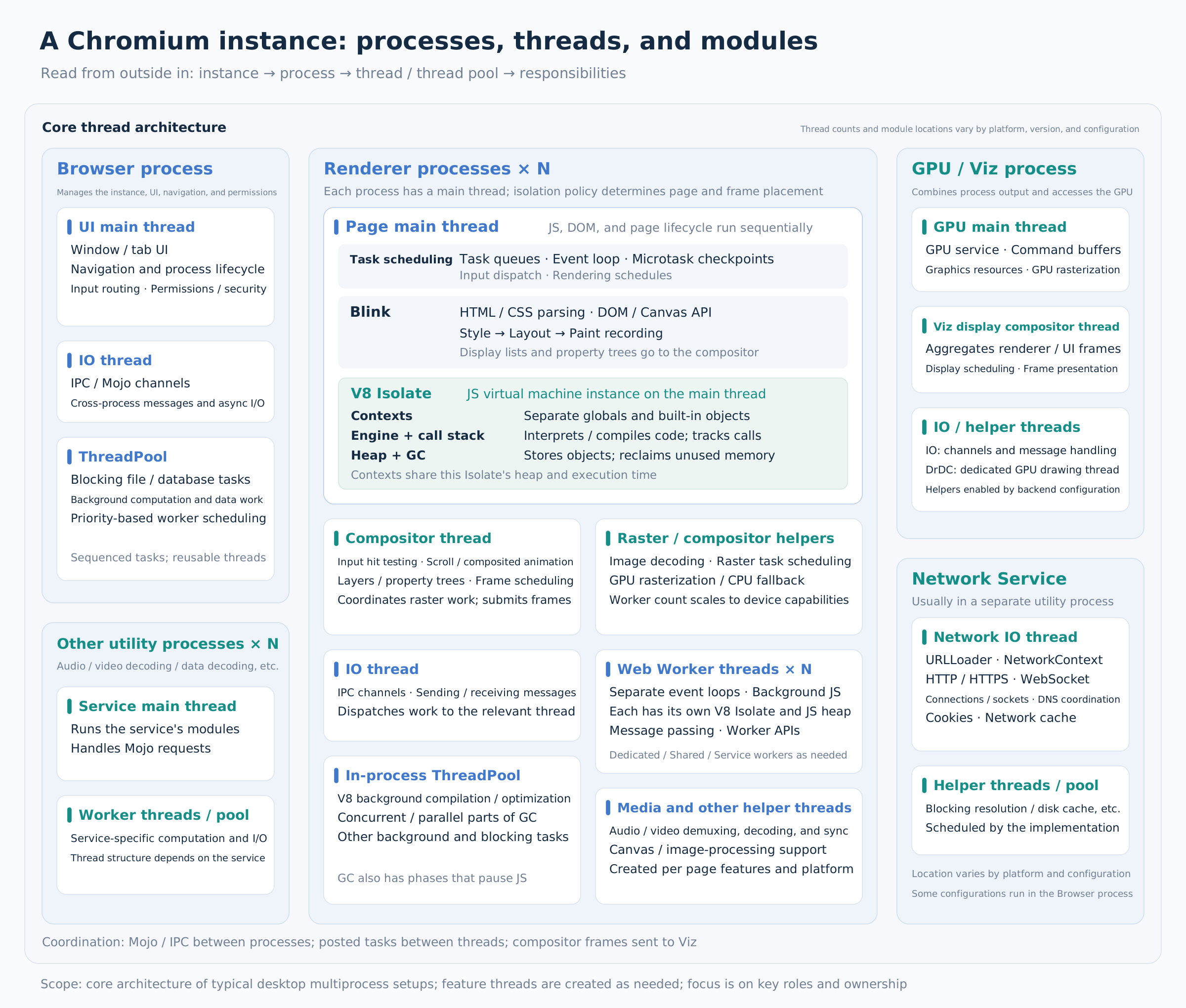
A typical desktop core architecture, from the outside in: instance → processes → threads and thread pools → functional modules. The exact threads and placement of modules vary by platform, version, and configuration. View the full diagram.
Also, the host's document.querySelector() can only query its own document. It cannot reach into the guest DOM inside a webview. The guest preload operates on the guest page; the host preload operates on the host page.
3. iframe, webview, and Dynamic Components Provide Different Kinds of Separation
An iframe has its own document and window, but that does not necessarily mean it has its own process. Chromium's site isolation can place a cross-site iframe in a separate renderer. This is an OOPIF, or out-of-process iframe. Cross-origin access restrictions and process isolation are different concepts as well.
A webview is an Electron embedding mechanism with its own guest webContents. The guest and host run in separate renderer processes, so it should not be treated as an ordinary DOM container. Electron currently advises against using webview in new projects. If you need a separate web content container, consider WebContentsView; if you only need an embedded frame within a page, consider an iframe.
A dynamically loaded React module, when rendered directly into the current page, is still a component within that page. Downloading code dynamically does not automatically create an iframe or add process isolation. Modules must also satisfy requirements such as compatible React versions and shared runtime instances.
Before choosing, ask: Do you need component reuse, a separate document, or a separate web content container?
4. What Problems Do IPC and MessagePort Each Solve?
ipcRenderer / ipcMain are Electron's application-facing communication APIs. In the current native implementation, common renderer–main IPC uses Chromium's Mojo mechanism underneath.
That does not mean all communication in Electron goes through Mojo. Node.js sockets, pipes, or other channels you create have their own implementations.
For ordinary application logic, IPC is usually the starting point:
send/on: send notificationsinvoke/handle: send a request and wait for its result
If two renderers need to exchange data continuously, the main process can first distribute a pair of MessagePorts. The endpoints can then send and receive messages through those ports.
Ordinary forwarding: renderer A → JavaScript callback in the main process → renderer B
Port-based communication: the main process distributes the ports first, then A and B exchange messages through them
What this removes is per-message forwarding by application JavaScript in the main process. It does not establish that there is no underlying routing, or that the connection is physically direct.
Ordinary IPC already reuses underlying communication infrastructure; it does not create a new connection for every message. MessagePort helps organize endpoints, support continuous message streams, and reduce application-level forwarding. Whether it is faster depends on message size, frequency, and processing, and should be measured.
Keep these three boundaries distinct, too:
| Boundary | Common approach |
|---|---|
| Page and preload contexts within the same renderer | contextBridge |
| Different execution threads, such as a page and a Worker | postMessage, MessagePort |
| Different processes, such as the main process and a renderer | Electron IPC, MessagePorts distributed to the endpoints |
postMessage is an API name. The name alone does not tell you whether it crosses contexts, threads, or processes.
5. Copy, Transfer, or Share: How Data Reaches the Other Side
The communication channel answers “from where to where?” The data-passing method answers “what does the receiver get?”
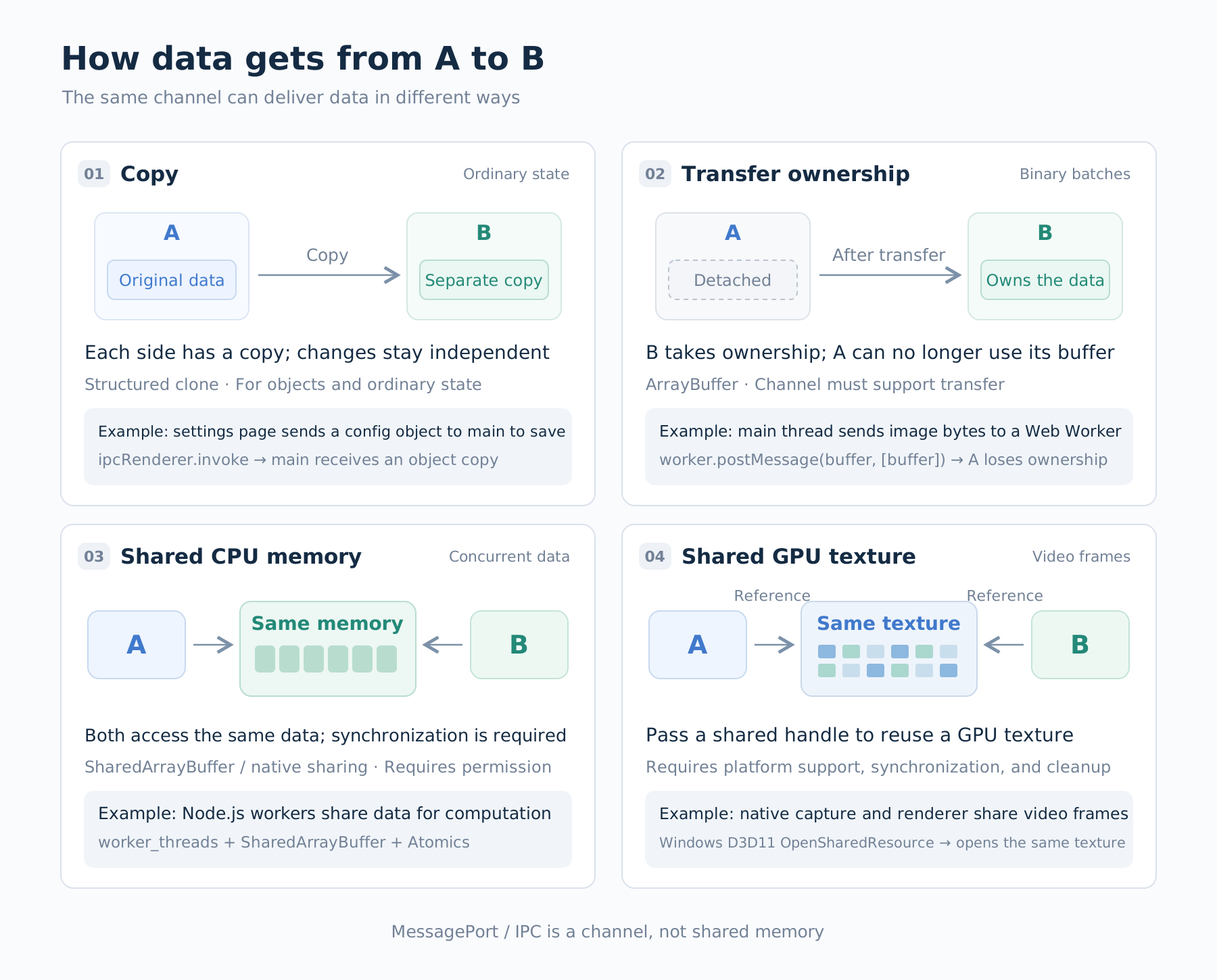
First choose how the data should be passed, then check whether the channel supports it. Sharing CPU memory and sharing GPU textures have different requirements.
Copy: Each Side Gets Independent Data
The structured clone algorithm reconstructs supported data types and object relationships. It can handle plain objects, arrays, Map, Date, circular references, and more. It preserves more information than JSON serialization.
const original = { name: 'panel' };
original.self = original;
const copy = structuredClone(original);

console.log(copy !== original); // true: this is a new object
console.log(copy.self === copy); // true: the circular relationship is preserved
But it does not move an entire JavaScript environment across. Functions and DOM nodes cannot be cloned this way, and custom prototype chains and class methods are not copied along with the data. Individual channels may impose further restrictions. For example, Electron's main process cannot receive some browser-specific objects. See the structured clone algorithm's supported types and limitations.
Here is an easy case to misread: if A modifies Array.prototype.includes, then sends an array to an independent environment B through a message that clones it, B does not inherit A's modification. The array B receives uses the array prototype from B's own environment.
However, if structuredClone(array) is called only within A's own environment, both the original and the new array still use A's array prototype, so the modification still applies. Cloning data does not reset the runtime environment.
Transfer: Hand Ownership to the Other Side
Web APIs that support transferable objects can transfer an ArrayBuffer:
// worker is an already-created Web Worker
const buffer = new ArrayBuffer(1024);
worker.postMessage({ buffer }, [buffer]);
console.log(buffer.byteLength); // 0: the sender's buffer has been detached
This transfers ownership; it does not let both sides keep using the original object together. It can reduce copying, but the API semantics alone do not guarantee physically zero-copy behavior on every cross-process path.
In particular, the transfer arguments of different postMessage APIs are not interchangeable. The transfer list for the current ipcRenderer.postMessage is MessagePort[]. You cannot directly reuse the Web Worker example above to transfer an ArrayBuffer through that API.
Share: Both Sides Access the Same Data
SharedArrayBuffer shares CPU memory. Reads and writes need coordination through mechanisms such as Atomics. It is not a transferable object, and it does not turn arbitrary JavaScript objects into shared objects.
On the browser side, requirements include a secure context and cross-origin isolation, and both sides must belong to the same agent cluster that permits sharing. Typically, this means configuring COOP / COEP correctly and checking crossOriginIsolated.
Configuring COOP / COEP does not let arbitrary pages share memory. The HTML specification imposes additional agent-cluster restrictions. A cross-site iframe cannot cross that boundary just because those two response headers are present. Nor should you assume that a host and its webview can directly share a SAB.
Shared GPU textures take a different route. They share graphics resources and require handling resource handles, synchronization between producers and consumers, cleanup after use, and platform and version support. They are not equivalent to SAB, nor are they simply a matter of sending a texture object in a JavaScript message. See Electron's sharedTexture API.
6. Answer Four Questions Before Writing the Code
- Who is communicating with whom? Two contexts in the same page, a Worker, or separate processes?
- Is isolation necessary? Reusing a component does not necessarily call for another web page environment
- What does the receiver need? A copy, ownership of a resource, or shared memory?
- Where is the actual bottleneck? Serialization, data copying, application-level forwarding, or a receiver that cannot keep up?
Draw the boundaries first, then choose the API. For most features, a narrow contextBridge interface and ordinary IPC are enough. Consider MessagePort, transfer, or shared resources when you actually need continuous data streams or large data transfers.
This article is based on the official documentation available when it was written. Electron's process allocation and underlying implementation may change between versions. Verify the behavior against the Electron / Chromium versions used in your project.