AI Coding in Practice: Context, Task Organization, and Validation Loops
 Ryan
RyanOn this page
NOTE
When using AI Coding, many of us run into the same problems: the model invents details when it is uncertain, long-running tasks drift, and an answer can sound clear while the implementation is still wrong. These problems can be decomposed into three dimensions:
- How to provide context: whether the agent receives sufficiently accurate context
- How to organize tasks: whether execution is placed inside a stable mechanism
- How to validate results: whether the output is constrained by a clear validation loop
How to Provide Context
From Vibe to Spec to Harness
These are three typical AI Coding patterns. The essential difference is not whether the model itself has become smarter, but how much freedom and constraint we give it.
| Pattern | Essence | Suitable tasks | What you need to give the AI | Main risk | Typical output |
|---|---|---|---|---|---|
| Vibe Coding | Fast exploration and iteration | Small changes, prototypes, demos, low-risk fixes | Clear boundaries, limited context, quick validation commands | Easy to drift; easy to mistake “it runs” for “it is correct” | A runnable first version |
| Spec-Driven Development | Align intent before implementation | Medium-complexity features, module refactors, dependency swaps | Goals, constraints, non-goals, validation criteria | Specs that grow stale or excessive can pollute context | A design document + staged implementation |
| Harness Loop | Put execution inside a loop system | Long-running, high-risk, cross-module, continuously advancing tasks | Task breakdown, externalized state, quality gates, rollback points | Without quality gates, automation amplifies mistakes | A repeatable execution loop that stays under control |
This is a clear progression:
Vibe answers: make something first
Spec answers: requirements drift easily
Harness answers: long tasks lose control, get interrupted, and accumulate disorder
They are not mutually exclusive. They increase the level of control step by step and compensate for the weaknesses of the previous stage.
Spec: Spec-Driven Development (SDD)
NOTE
In one sentence: use structured documents to move a task from “conversation-driven” to “state-driven,” and stabilize the model’s behavior in multi-step development through external constraints.
Three Core Principles
Intent first: clarify what to do before discussing how to do it
Externalized specification: extract goals, boundaries, constraints, and validation from the conversation
Progressive refinement: move from high-level requirements to technical implementation step by step, avoiding the limits of one-shot generation
The value of this approach is not to make AI more creative, but to make it guess less and align more.
Understanding Spec-Driven-Development: Kiro, spec-kit, and Tessl notes that the definition of “spec-driven development” is still evolving. It is more like a family of practices than a mature, fixed methodology, so it should be viewed dialectically.
Source: Understanding Spec-Driven-Development: Kiro, spec-kit, and Tessl
The definition of SDD is still in flux.
OpenSpec: Persist Change State in the File System
OpenSpec is a typical way to implement Spec-driven work.
It splits a change into documents such as proposal / specs / design / tasks, then uses a flow like propose -> apply -> archive to turn a change into explicit, reviewable, versioned state.
In other words, it externalizes the key state that model execution depends on from “session memory” into the “file system.”
A typical Spec file-system structure looks roughly like this:
openspec/
├── project.md              # Project conventions
├── specs/                  # Current system truth - what has been built
│   └── [capability]/           # One focused capability
│       ├── spec.md             # Requirements and scenarios
│       └── design.md           # Technical patterns
├── changes/                # Proposals, task lists, and spec deltas for each change
│   ├── [change-name]/
│   │   ├── proposal.md         # Proposal
│   │   ├── tasks.md            # Implementation checklist
│   │   ├── design.md           # Technical decisions, optional depending on standard
│   │   └── specs/              # Incremental changes
│   │       └── [capability]/
│   │           └── spec.md         # ADDED/MODIFIED/REMOVED
│   └── archive/                # Completed changes
The benefits are direct:
The current task no longer depends only on chat context
Why a change is made, how it will be made, and how far it has progressed can all be reviewed and tracked
Multi-turn execution, cross-session recovery, and task handoff become much more stable
NOTE
The cost is also obvious: too many constraints introduce higher system complexity and maintenance cost. Without governance, they can create document bloat, context noise, and distorted state. Augment Code points out in What spec-driven development gets wrong that code is still the most reliable source of truth; specs are useful, but once they stop being maintained, they decay quickly.
Therefore, I personally prefer to treat Spec as an execution scaffold for short- and medium-term tasks, rather than long-term system memory. Its core value is constraining the execution process.
Superpowers: Trade Process for Stability
Superpowers represents another style.
It does not impose a heavy file-spec system. Instead, it is closer to a workflow: clarify the problem, write a plan, then execute.
The typical path in the official repository is: brainstorming -> writing-plans -> subagent-driven-development / executing-plans.
In my own use, I often ask the agent to first clarify the problem in Plan mode or during brainstorming, produce a structured plan and todo list, and then begin execution.
NOTE
The cost of Superpowers is also clear: it introduces additional context and execution overhead. In practice, it trades process, time, and context budget for more stable and controllable execution.
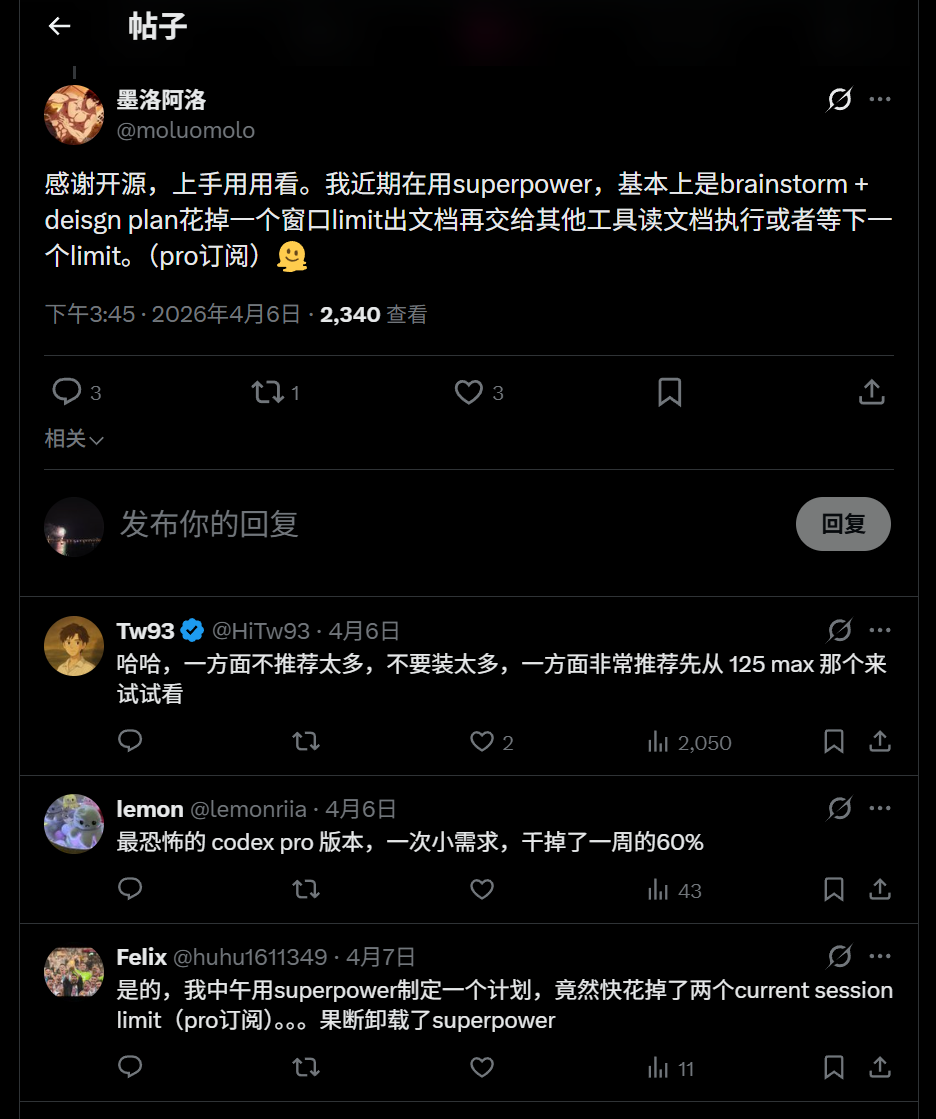
This type of approach is better for long tasks, tasks that can drift, and tasks that need phase-by-phase checks. It is not meant for a small issue that can be fixed in a few minutes.
# Install Skills
npx skills add https://github.com/obra/superpowers
Context Should Be Accurate, Not Just Large
NOTE
High-quality context supply is critical to model behavior. Good context design helps the model understand tasks faster, reduce hallucinations, and improve output quality. Too much context, however, also creates noise and scatters the model’s attention.
Anthropic notes in Effective context engineering for AI agents that context is a critical but finite resource. As token count increases, the model’s attention budget is consumed; the benefit is not linear and can show diminishing returns.
Source: Effective context engineering for AI agents
Context is critical but finite; as the context window grows, accurate recall becomes harder.
In other words, once the context becomes too long and too much information is mixed in, the problem is no longer that the model “cannot see” the information. The problem is that it cannot reliably judge what signal is truly important.
So the point of context design is not to feed in every piece of material. It is to do two things:
Put the most important information where the model can see it most easily
Tell the model where to find the rest
AGENTS.md
AGENTS.md is usually the model’s default entry point. It is best for high-density, strongly controlling information that cannot be directly inferred from code, such as:
Architecture entry points
Key module indexes
Default command entry points
Forbidden areas and constraints
Minimum completion criteria
Scope-control principles
It is not suitable for long background descriptions, and it should not repeat everything already in docs. Once AGENTS.md tries to include everything, it degenerates from a “control entry point” into a “noise entry point.” It should follow the principle of minimum necessity.
docs
I understand docs as a layered, on-demand context system for preserving key long-term repository memory.
It is mainly used to accumulate knowledge that is stable over time and continuously affects task judgment, such as:
Architecture docs: system structure, key data flow, core boundaries
Module docs: module responsibilities, key entry points, dependencies
Engineering conventions: validation methods, review rules, workflow conventions
The benefit is that the model does not need to read the entire repository at the beginning. It first knows where it should look.
Model Context Anxiety
A larger context window does not mean long-task problems naturally disappear.
Anthropic mentions in Harness design for long-running application development an interesting phenomenon: as context keeps growing, the model may show a tendency to “wrap things up,” start summarizing too early, avoid expanding further, or conservatively declare that the task is basically done. This does not necessarily mean the model has truly judged the task complete; it may be behavior contraction driven by context pressure.
Source: Harness design for long-running application development
The article describes long-task coherence loss and “context anxiety,” and recommends context resets with structured handoff to address them.
That is why the truly effective approach for long tasks is usually not simply feeding more context, but doing three things:
Compress: summarize execution history into a high-fidelity digest
Externalize: explicitly write goals, state, validation, and risks into repo files
Reset: when the task enters a new phase, let a new session take over through handoff
The source article’s conclusion is also clear: for long tasks, simple compaction is not always enough. Often, context reset with structured handoff is more stable than continuing to compress a bloated context window, because it preserves state while giving the model cleaner context.
So my understanding is: stable long-running work cannot rely only on model memory. Building a system that can persist, recover, and hand off context may be more important.
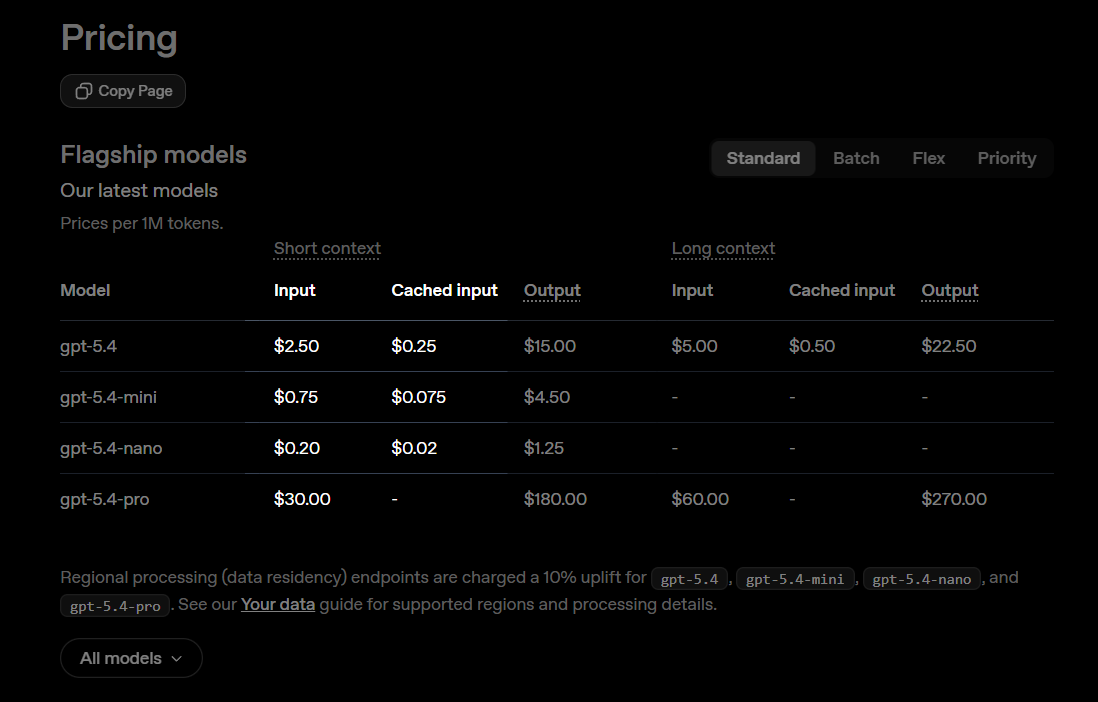
Another point worth noting: avoid frequent manual context compression, and avoid switching models inside the same conversation window. In most IDE / CLI multi-turn sessions, new input is appended after a stable prefix, and that stable prefix is easier to reuse through prompt caching. If you manually compress the context into a new summary midway, or switch models to continue the same task, the originally reusable context may become invalid, increasing token computation cost.
So the general recommendation is: preserve the continuity of a single session as much as possible, leave compression to the system or to phase handoff, and split tasks for different models into different conversation windows.
How to Organize Tasks
Project Orchestration for Long Tasks
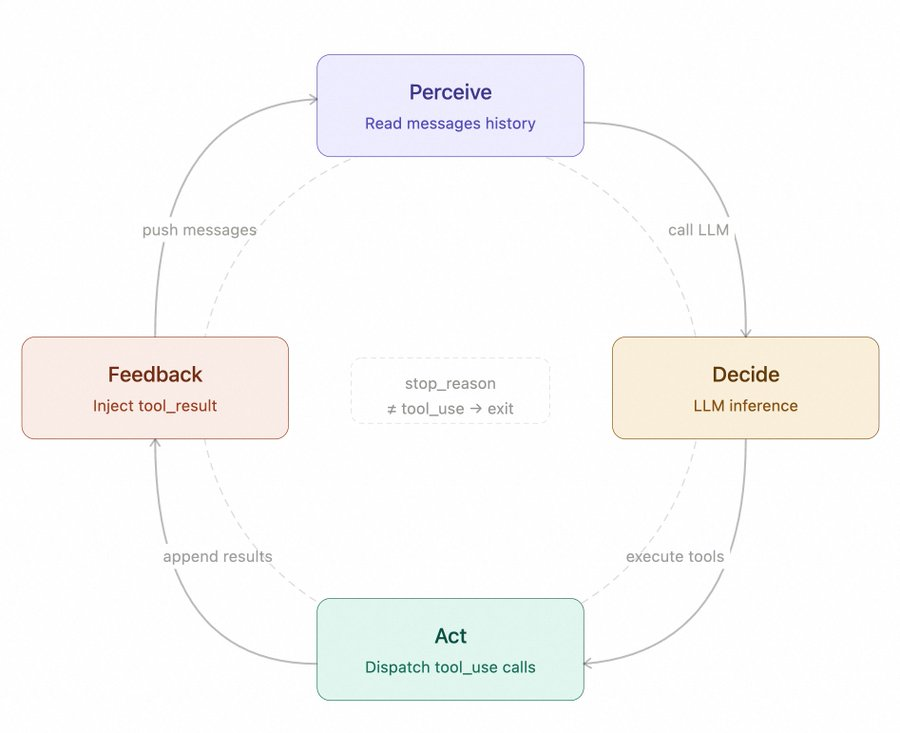
OpenAI states clearly in Run long horizon tasks with Codex that what makes long tasks stable is usually not a longer prompt, but the agent loop the model operates inside.
Source: Run long horizon tasks with Codex
Long-running work depends less on one giant prompt and more on the agent loop around the model.
Through process orchestration and file design, they enabled GPT-5.3-Codex at “Extra High” reasoning to run for about 25 hours, consume about 13 million tokens, and generate about 30,000 lines of code. The core was splitting the agent loop into seven steps:
Plan
Edit code
Run tools (tests / build / lint)
Observe results
Repair failures
Update docs / status
Repeat
When the agent keeps working inside a loop with feedback, repair, and state updates, it gains real feedback, externalized state, and the ability to keep correcting course over time.
Source code: https://github.com/derrickchoi-openai/design-desk/blob/main/docs/prompt.md
repo/
├── AGENTS.md            # Long-term rules: directories, commands, constraints, done definition
├── Prompt.md            # Defines goals and deliverables: spec + deliverables
├── Plan.md              # Milestones and validation
├── Implement.md         # Runbook: follow the plan, keep diffs scoped, run validations, update docs
└── Documentation.md     # Shared memory and audit log: state, decisions, run method, follow-ups
Below is a context orchestration example for a desktop app project. Compared with the minimal loop above, it further separates documents by responsibility, persists them separately, and externalizes plans and checkpoints.
Long-term stable information goes in
AGENTS.mdanddocs/The current task plan goes in
PLANS/ACTIVE.mdHow to execute, review, and hand off goes in
RUNBOOKS/Validation entry points are fixed as scripts such as
validate.sh / smoke.sh
This makes it possible to quickly recover context and continue after a task is interrupted or moved across sessions.
desktop_app/
├── AGENTS.md                         # AI collaboration entry: global rules, reading order, key boundaries
├── docs/                             # Long-term memory: only stable knowledge
│   ├── INDEX.md                      # Documentation navigation: tells people and agents what to read first
│   ├── ARCHITECTURE/                 # Architecture docs: explain system-level structure
│   ├── MODULE/                       # Module map: explains repository subsystems by directory
│   └── ENGINEERING/                  # Engineering conventions: validation, review, workflow
├── PLANS/                            # Execution-time plans: active task plans, not long-term memory
│   ├── ACTIVE.md                         # Current active plan: task list, milestones, execution log
│   └── _TEMPLATE.md                      # Plan template
├── RUNBOOKS/                         # Action protocols: tells agents and developers exactly how to act
│   ├── Handoff.md                        # Handoff protocol: what must be delivered at the end
│   ├── Implement.md                      # Implementation protocol: required actions before and after editing
│   └── Review.md                         # Review protocol: self-check and peer-check steps
└── .agents/                          # Agent collaboration assets: roles and repo-level skills
    ├── roles/                        # Sub-agent role cards
    │   ├── implementer.md
    │   ├── reader.md
    │   ├── reviewer.md
    │   └── tester.md
    └── skills/                       # Repo-level skills: reusable workflows
        ├── code-review.md
        └── smoke-test.md
Agent Teams / Sub Agents
These two capabilities are not “the more agents, the more advanced.” They are a way to introduce controlled division of labor when a single agent is already struggling.
OpenAI recommends in A practical guide to building agents that teams start from the simpler system by default and only consider more complex agent orchestration when the complexity clearly exceeds what a single agent can handle reliably.
Source: A practical guide to building agents
Maximize a single agent’s capabilities first.
Anthropic also discusses the benefits of multi-agent systems and their significantly increased token cost in How we built our multi-agent research system.
Source: How we built our multi-agent research system
Multi-agent architectures can improve performance on valuable, highly parallel tasks, but they burn through tokens quickly and are not a good fit for domains where agents must share the same context or have many dependencies.
In other words, multi-agent systems can certainly help, but only if the task itself is truly suitable for parallel decomposition.
The Task Is Naturally Parallel
For example, for an Electron requirement, you can assign two or three agents to separately inspect the impact on main / renderer / bridge, then let the lead agent summarize the result into a change map.
Or for a complex PR, different agents can separately check security risk, change impact, whether API or IPC contracts were broken, and whether docs, scripts, or config need updates.
Subtasks Need Different Work Modes
At this point, the value of Sub Agents is not just “doing several things at once,” but isolating different work modes. For example:
reader: only reads code, maps dependencies, and identifies impactimplementer: only makes scoped implementation changes and avoids diff sprawltester: only adds tests, runs validation, and summarizes failuresreviewer: only checks the diff, scope, risk, and whether it is truly mergeable
Separate Execution and Evaluation Roles
Anthropic mentions a practical issue in Harness design for long-running application development: agents tend to be too lenient when evaluating their own output. Separating roles can improve the stability of long tasks.
So in practice, you can try:
The lead agent maintains the goal and overall state
Sub agents perform local exploration or local implementation
reviewer / evaluator only judges whether the result meets the bar
Anthropic’s multi-agent system uses a similar orchestration mode: a lead agent plans and coordinates, subagents execute in parallel, and the lead agent collects and judges the results.
But not every task deserves Agent Teams. When task boundaries are unclear, subtasks are too tightly coupled, or the context limit is not the bottleneck, multiple agents will only amplify the chaos. OpenAI’s advice is essentially the same: use a single agent well first, then introduce more orchestration complexity only when necessary.
A useful rule of thumb is: split the task plan and checkpoints first, then decide whether to split agents. If you cannot define checkpoints, you are probably not ready for Agent Teams.
How to Validate Results (Exploring)
TDD: Test-Driven Development
Before changing code, first clarify the expected outcome. For example:
Which functions must work
Which edge cases must be covered
Which old behavior must not break
Which validation commands must pass at minimum
OpenAI also emphasizes this in Run long horizon tasks with Codex: every milestone should be validated. It is not done when code is written; it is done when validation passes. The summary also lists tests / lint / typecheck / build as part of continuous validation.
In daily use, I plan to split this into two fixed entry files. The benefit is that the agent does not need to infer how to validate each task from scratch. It only needs to run fixed commands and check the core items.
validate.sh
Only include “high-frequency, stable, core” checks, usually: ESLint, typecheck, build, unit tests, and necessary integration tests.
smoke.sh
Check startup and P0 critical paths, such as:
Whether the app can start normally
Whether the homepage can open
Whether the core operation can complete once
Whether key logs contain obvious errors
Technical Choice for Test Entrypoints: CLI / MCP
MCP vs. CLI for AI-native development summarizes this clearly:
Source: MCP vs. CLI for AI-native development
The CLI vs. MCP question is really about where you are in the development loop. CLI fits the inner loop; MCP fits the outer loop. Most teams need both.
There is another point worth noting: MCP is up to 32× more expensive than CLI. Here’s why we still use it. used 75 benchmark runs and found that CLI was 10-32x cheaper and more reliable in that benchmark.
Source: MCP vs CLI: Benchmarking AI Agent Cost & Reliability
In this benchmark, CLI won on efficiency metrics and reliability, while MCP remained useful for shared and governed access.
Therefore, for local desktop app testing scenarios, I think exposing atomic test capabilities through CLI is more efficient. MCP is more about exposing existing capabilities to external agents.
It is also worth trying CLI-Anything to turn a local app’s atomic capabilities into CLI commands and apply them to testing.
Usage Summary
Repository documentation orchestration should follow the minimum necessary principle: put long-term stable rules in
AGENTS.md / docs, and externalize current goals, state, validation, and risks into plan files.Task execution should only provide the necessary context for the current stage.
Do not frequently compress context manually, and do not switch models back and forth in the same session.
Use lightweight Vibe for small tasks; use Spec for more complex tasks; for long tasks, plan the Agent Loop carefully. Test cases are essential.
Use Sub Agents / Agent Teams only when needed.
Try using CLI for test entrypoints; execution will be more efficient.
Closing
I suddenly realized that life, in some sense, is also a giant self-attention mechanism. The future is always masked. We cannot see the full answer. We can only carry the KV cache accumulated from the past and keep calculating the probability distribution of the next token through each choice. Along the way, external feedback is like a reward model, continuously scoring our decisions. The detours, losses, and corrections we experience are like actor loss, gradually updating how we face the future. So we continue to generate, revise, and move forward through this iteration. Perhaps from a higher perspective, a long life is only one sentence, and each stage of life is only one token in it. But only when we finally look back do we understand that the detours we thought were wasted, the losses we thought were meaningless, and the repeated moments of correction all participated in completing our own backpropagation.
May we all continue to generate something worth looking back on in our own sequence.
And may every token land with meaning, step by step, until we converge toward our own best result.